beagle-embed: a chat panel on your own page
An npm package that opens a Beagle chat panel inside an element you already have, and only after the visitor asks. Written for version 0.2.2.
November 2026What it is
@decentnetwork/beagle-embed opens a Beagle chat panel inside a page you already have. The page stays as it is. The chat's scripts load only after the visitor opens the panel, and only inside that panel.
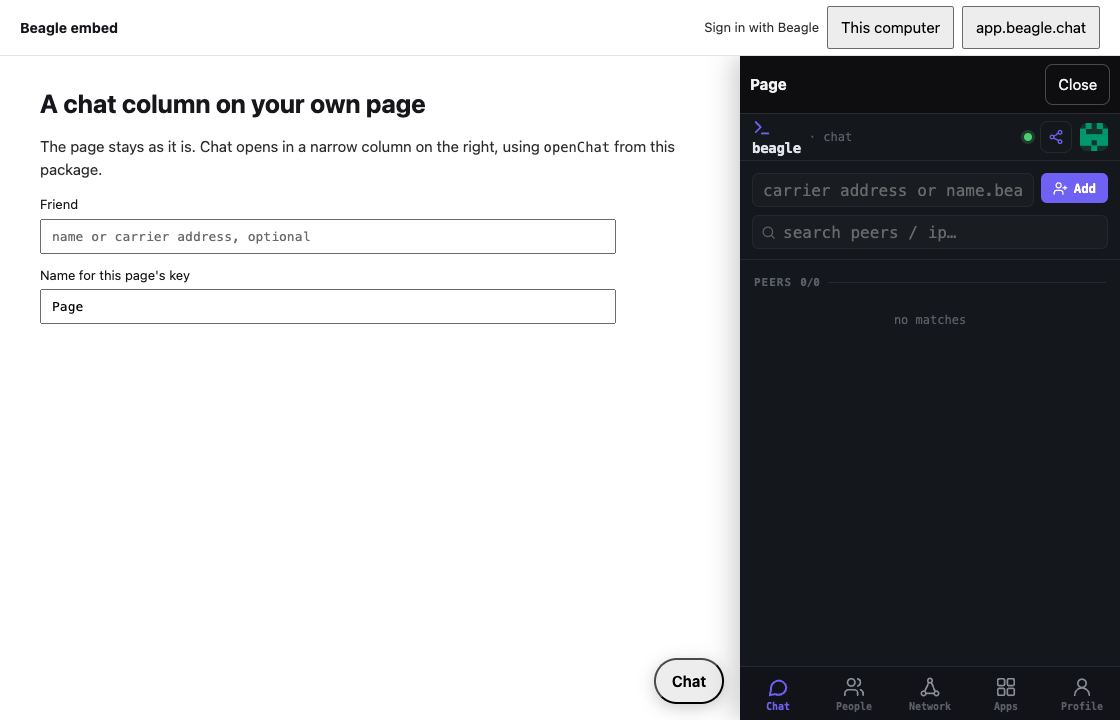
Use it when the conversation should sit in an element you laid out, and the rest of the page should stay put. @decentnetwork/beagle-ui's mount() draws over the whole viewport, and the beagle-web bundle boots as the page. Loading either one in your document would replace the page. This package loads both after the click, inside a frame the size of your element. It does not contain a copy of either.
An identity is a key made on the visitor's device. The userid is its public half. app.beagle.chat is one place that key can live, not the centre. Beagle installed on this computer is another place, and it keeps its own key. This page is version 0.2.2, the latest tag on npm.
Install, and open the panel
mkdir my-page && cd my-page
npm init -y
npm install @decentnetwork/beagle-embed@0.2.2
npm install tweetnacl@1.0.3
When Beagle is on this computer, the smallest call frames that client. The key stays in the client. reason is "client". el is the element you already laid out.
import { openChat } from "@decentnetwork/beagle-embed";

const result = await openChat(el, {
  clientOrigin: "http://127.0.0.1:8766",
});
This run returned opened: true, reason: "client", and the frame's address was http://127.0.0.1:8766/.
Which Beagle answers
openChat returns { opened, reason, openUrl }. The installed app and app.beagle.chat can each hold a different key.
- This computer. Set
clientOrigintohttp://127.0.0.1:8766orhttp://localhost:8766. The panel is that client.reasonis"client". The key is not copied into the page. - A public origin. Set
clientOrigintohttps://app.beagle.chat. The panel is not a frame. It says the key stays in its own tab, and it shows a link.reasonis"web-client". When you pass an address,openUrlhas?address=. - This page's key. No
clientOrigin. The panel is/beagle-frame.html, which you serve.frameHtml()is that document.about:blankis not used. The address is a query parameter, not a hash. The key islocalStoragebeagle-connect:identity, copied into the store the in-tab peer reads before that peer starts. With no key, and Beagle answering on port 8766, the panel does not open andreasonis"installed". With no key and nothing on 8766,reasonis"need-sign-in".mode: "in-tab"skips the 8766 check and still needs the key.
Example
The package ships example/index.html. This is that file.
<!doctype html>
<html lang="en">
<head>
<meta charset="utf-8">
<meta name="viewport" content="width=device-width, initial-scale=1">
<title>Beagle embed</title>
<link rel="stylesheet" href="/example/example.css">
</head>
<body>
<header>
  <strong>Beagle embed</strong>
  <div id="session" class="row">
    <span id="sign-label">Sign in with Beagle</span>
    <button id="sign-local" type="button">This computer</button>
    <button id="sign-web" type="button">app.beagle.chat</button>
    <strong id="who" hidden></strong>
    <button id="sign-out" type="button" hidden>Sign out</button>
  </div>
</header>
<main>
  <h1>A chat column on your own page</h1>
  <div class="intro">
    <p>The page stays as it is. Chat opens in a narrow column on the right, using <code>openChat</code> from this package.</p>
    <ol>
      <li><strong>Sign in with Beagle</strong>, then choose This computer or app.beagle.chat, and approve in the window that opens. The header keeps that name and userid above the column. Signing in does not open the column.</li>
      <li><strong>Chat</strong>, the button at the lower right, opens the column as that signed-in userid. An address opens that friend. This computer is embedded in the column. app.beagle.chat keeps its key in its own tab, so the column shows a link.</li>
      <li>With nobody signed in, Chat still opens. It uses a key this browser made for this page. <strong>Sign out</strong> forgets the account and leaves the column open on that key. <strong>Close</strong> hides the column.</li>
    </ol>
  </div>
  <label>Friend <input id="address" autocomplete="off" spellcheck="false" placeholder="name or carrier address, optional"></label>
  <label>Name for this page's key <input id="name" autocomplete="off" placeholder="optional, used only when signed out"></label>
  <p id="note"></p>
</main>
<button id="chat" class="launcher" type="button">Chat</button>
<div id="dock" class="dock" hidden>
  <div class="dock-bar">
    <strong id="dock-title">Chat</strong>
    <button id="close-chat" type="button">Close</button>
  </div>
  <div id="dock-body"></div>
</div>
<script src="/vendor/nacl.js"></script>
<script type="module" src="/example/main.js"></script>
</body>
</html>
The README tells you to run npm install, then BEAGLE_WEB_PUBLIC=… npm run serve. The published tarball does not include scripts/serve.mjs. In a fresh folder, npm reports Missing script: "serve". Inside the installed package, Node exits with MODULE_NOT_FOUND for scripts/serve.mjs. The example also loads /vendor/nacl.js, and tweetnacl is not installed with the package.
Save this as server.mjs. It serves the example, /beagle-frame.html, the package source, nacl, beagle-ui, and a beagle-web public/ directory. It does not copy those files.
import { createServer } from "node:http";
import { createReadStream, existsSync, statSync } from "node:fs";
import { extname, join, normalize } from "node:path";

const pkg = "node_modules/@decentnetwork/beagle-embed";
const web = process.env.BEAGLE_WEB_PUBLIC;
const ui = "node_modules/@decentnetwork/beagle-ui/dist/beagle-ui.js";
const nacl = "node_modules/tweetnacl/nacl-fast.min.js";
const types = {
  ".html": "text/html; charset=utf-8",
  ".js": "text/javascript; charset=utf-8",
  ".css": "text/css; charset=utf-8",
};

function under(root, rel) {
  const base = normalize(root + "/");
  const file = normalize(join(root, rel));
  return file.startsWith(base) ? file : null;
}

function fileFor(url) {
  const path = decodeURIComponent((url || "/").split("?")[0]);
  if (path === "/" || path === "/example" || path === "/example/") return join(pkg, "example/index.html");
  if (path === "/beagle-frame.html") return join(pkg, "frame/beagle-frame.html");
  if (path.startsWith("/example/") || path.startsWith("/src/")) return under(pkg, path.slice(1));
  if (path === "/vendor/nacl.js") return nacl;
  if (path === "/vendor/beagle-ui.js") return ui;
  if (path === "/beagle-web.js" || path.startsWith("/vendor/")) return under(web, path.slice(1));
  return null;
}

if (!web) throw new Error("set BEAGLE_WEB_PUBLIC to a beagle-web public/ directory");

const port = Number(process.env.PORT || 0);
const server = createServer((req, res) => {
  const file = fileFor(req.url);
  if (!file || !existsSync(file) || !statSync(file).isFile()) {
    res.writeHead(404);
    res.end("not found");
    return;
  }
  res.writeHead(200, {
    "content-type": types[extname(file)] || "application/octet-stream",
    "cache-control": "no-store",
  });
  createReadStream(file).pipe(res);
});
server.listen(port, "127.0.0.1", () => {
  const got = server.address().port;
  console.log("http://127.0.0.1:" + got + "/example/");
});
BEAGLE_WEB_PUBLIC=/path/to/beagle-web/public node server.mjsBEAGLE_WEB_PUBLIC points at a directory that contains beagle-web.js and a vendor/ directory with the files in the table below. With PORT unset, the process picks a free port and prints the example URL.
What you should see. Checked on 0.2.2.
- The first load requests the example CSS,
nacl.js,main.js,open.js,frame.jsandaccount.js. It does not request the chat bundles. - With nobody signed in, type a name and click Chat. The column opens under that name. The note says the chat is this page's key. The frame is
/beagle-frame.html. An address you typed is theaddressquery parameter, and the hash is empty. Close hides the column. - The sign-in buttons open a popup. This run's browser blocked the popup, so the header never showed a signed-in name.
- The peer list stayed empty. No friend request was sent, and no message was delivered.
Sign out in the example removes only the session record beagle-embed:demo-session. It does not delete the key. This run did not reach that button. The line in the page that says it forgets the account overstates what the script does.
Serve the assets yourself
These files have to come from your own origin. @decentnetwork/beagle-ui 0.2.40 is a dependency, and its build is the beagleUi URL. @decentnetwork/beagle-web is not on npm, so beagleWeb is a file you already have. Serve frame/beagle-frame.html at /beagle-frame.html.
| `assets` field | File |
|---|---|
react | vendor/react.production.min.js |
reactDom | vendor/react-dom.production.min.js |
qrcode | vendor/qrcode.js |
peerWebrtc | vendor/peer-webrtc.js |
chatComponents | vendor/chat-components.js |
beagleWeb | beagle-web.js |
beagleUi | node_modules/@decentnetwork/beagle-ui/dist/beagle-ui.js |
- It does not publish
@decentnetwork/beagle-web. That bundle is a script, not an import. You pass its URL. - It does not copy the installed app's key into the page.
- It does not start a peer when this origin has no key.
- The example dock is 380px wide, and full screen under 700px. A frame under 700px is laid out as a phone, so the conversation fills the panel.
More
The package is on npm and GitHub. Sign-in on your own server is beagle-connect and beagle-service. The README's example section still says the frame hash is #?address=. On 0.2.2 the address is a query parameter of /beagle-frame.html, which is what ran above.