beagle-embed:在你自己的页面里打开聊天面板
一个 npm 包。访客点开时,才在你已经放好的元素里打开 Beagle 聊天面板。按 0.2.2 编写。
2026 年 11 月它是什么
@decentnetwork/beagle-embed 在你已经有的页面里打开一个 Beagle 聊天面板。页面本身保持原样。聊天的脚本只在访客打开面板之后才加载,而且只加载在面板里面。
当对话应该落在你排好的元素里、页面其余部分保持不动时,用这个包。@decentnetwork/beagle-ui 的 mount() 会铺满整个视口,beagle-web 的包则会把自己当成整页启动。把两者直接放进你的文档,页面就会被换掉。这个包在点击之后才加载它们,并且放在一个和你的元素一样大的框架里。它不自带这两份代码的副本。
身份是在访客设备上生成的一把密钥。userid 是它的公钥。app.beagle.chat 是这把密钥可以存放的一个地方,不是中心。装在这台电脑上的 Beagle 是另一个地方,密钥留在那里。本页写的是 npm 上 latest 的 0.2.2。
安装,并打开面板
mkdir my-page && cd my-page
npm init -y
npm install @decentnetwork/beagle-embed@0.2.2
npm install tweetnacl@1.0.3
这台电脑上有 Beagle 时,最小的一次调用会把那个客户端放进框架。密钥留在客户端里。reason 是 "client"。el 是你已经放好的元素。
import { openChat } from "@decentnetwork/beagle-embed";

const result = await openChat(el, {
  clientOrigin: "http://127.0.0.1:8766",
});
这一次返回 opened: true、reason: "client",框架的地址是 http://127.0.0.1:8766/。
哪一个 Beagle 在应答
openChat 返回 { opened, reason, openUrl }。装在电脑上的应用和 app.beagle.chat 可以各持有一把不同的密钥。
- 这台电脑。
clientOrigin为http://127.0.0.1:8766或http://localhost:8766。面板就是那个客户端。reason是"client"。密钥不会被复制进页面。 - 一个公开来源。
clientOrigin为https://app.beagle.chat。面板不是框架。它写着这把密钥留在自己的标签页里,并给出链接。reason是"web-client"。传了地址时,openUrl带?address=。 - 这个页面的密钥。 不传
clientOrigin。面板是/beagle-frame.html,由你提供;frameHtml()就是那份文档。不用about:blank。地址是查询参数,不是 hash。密钥在localStorage的beagle-connect:identity,会在页内 peer 启动前被复制到它读取的存储。没有这把密钥、而 8766 有应答时,面板不打开,reason是"installed"。没有密钥、8766 也没有应答时,reason是"need-sign-in"。mode: "in-tab"跳过 8766 的检查,仍然需要这把密钥。
示例
包里带有 example/index.html。下面就是这个文件。
<!doctype html>
<html lang="en">
<head>
<meta charset="utf-8">
<meta name="viewport" content="width=device-width, initial-scale=1">
<title>Beagle embed</title>
<link rel="stylesheet" href="/example/example.css">
</head>
<body>
<header>
  <strong>Beagle embed</strong>
  <div id="session" class="row">
    <span id="sign-label">Sign in with Beagle</span>
    <button id="sign-local" type="button">This computer</button>
    <button id="sign-web" type="button">app.beagle.chat</button>
    <strong id="who" hidden></strong>
    <button id="sign-out" type="button" hidden>Sign out</button>
  </div>
</header>
<main>
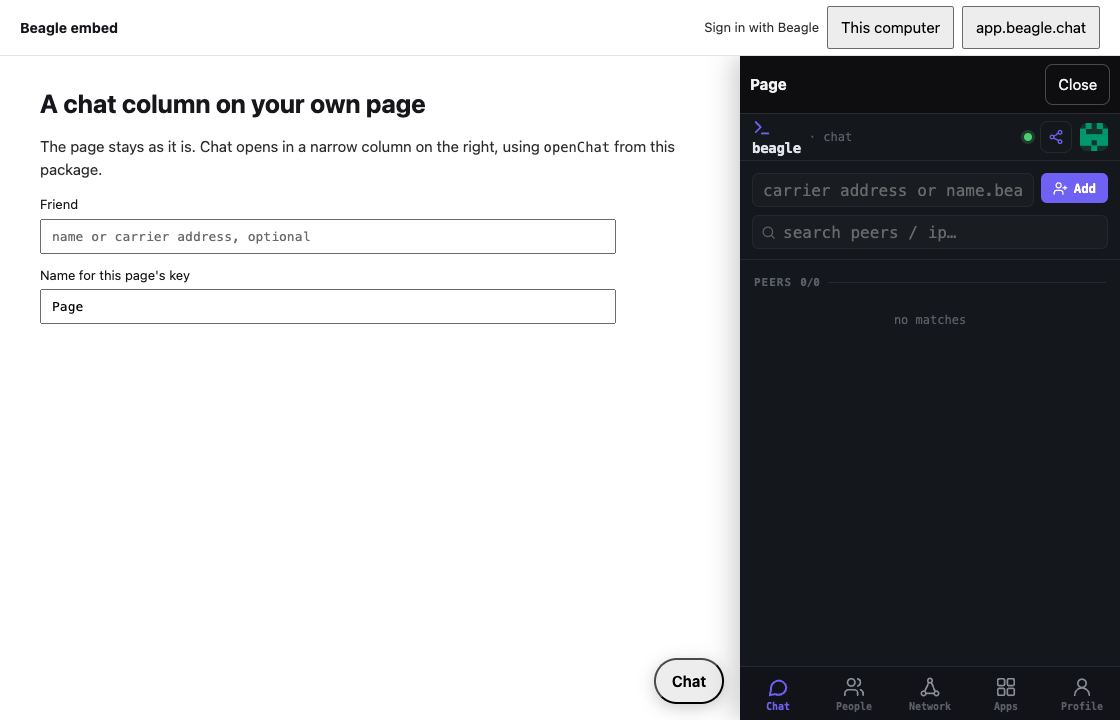
  <h1>A chat column on your own page</h1>
  <div class="intro">
    <p>The page stays as it is. Chat opens in a narrow column on the right, using <code>openChat</code> from this package.</p>
    <ol>
      <li><strong>Sign in with Beagle</strong>, then choose This computer or app.beagle.chat, and approve in the window that opens. The header keeps that name and userid above the column. Signing in does not open the column.</li>
      <li><strong>Chat</strong>, the button at the lower right, opens the column as that signed-in userid. An address opens that friend. This computer is embedded in the column. app.beagle.chat keeps its key in its own tab, so the column shows a link.</li>
      <li>With nobody signed in, Chat still opens. It uses a key this browser made for this page. <strong>Sign out</strong> forgets the account and leaves the column open on that key. <strong>Close</strong> hides the column.</li>
    </ol>
  </div>
  <label>Friend <input id="address" autocomplete="off" spellcheck="false" placeholder="name or carrier address, optional"></label>
  <label>Name for this page's key <input id="name" autocomplete="off" placeholder="optional, used only when signed out"></label>
  <p id="note"></p>
</main>
<button id="chat" class="launcher" type="button">Chat</button>
<div id="dock" class="dock" hidden>
  <div class="dock-bar">
    <strong id="dock-title">Chat</strong>
    <button id="close-chat" type="button">Close</button>
  </div>
  <div id="dock-body"></div>
</div>
<script src="/vendor/nacl.js"></script>
<script type="module" src="/example/main.js"></script>
</body>
</html>
README 让你运行 npm install,然后 BEAGLE_WEB_PUBLIC=… npm run serve。发布的压缩包不含 scripts/serve.mjs。在一个新目录里,npm 报告 Missing script: "serve"。在已安装的包目录里,Node 以 MODULE_NOT_FOUND 退出,找不到 scripts/serve.mjs。示例还要加载 /vendor/nacl.js,而 tweetnacl 不会随这个包装上。
把下面存成 server.mjs。它提供示例、/beagle-frame.html、包的源码、nacl、beagle-ui,以及一个 beagle-web 的 public/ 目录。它不复制这些文件。
import { createServer } from "node:http";
import { createReadStream, existsSync, statSync } from "node:fs";
import { extname, join, normalize } from "node:path";

const pkg = "node_modules/@decentnetwork/beagle-embed";
const web = process.env.BEAGLE_WEB_PUBLIC;
const ui = "node_modules/@decentnetwork/beagle-ui/dist/beagle-ui.js";
const nacl = "node_modules/tweetnacl/nacl-fast.min.js";
const types = {
  ".html": "text/html; charset=utf-8",
  ".js": "text/javascript; charset=utf-8",
  ".css": "text/css; charset=utf-8",
};

function under(root, rel) {
  const base = normalize(root + "/");
  const file = normalize(join(root, rel));
  return file.startsWith(base) ? file : null;
}

function fileFor(url) {
  const path = decodeURIComponent((url || "/").split("?")[0]);
  if (path === "/" || path === "/example" || path === "/example/") return join(pkg, "example/index.html");
  if (path === "/beagle-frame.html") return join(pkg, "frame/beagle-frame.html");
  if (path.startsWith("/example/") || path.startsWith("/src/")) return under(pkg, path.slice(1));
  if (path === "/vendor/nacl.js") return nacl;
  if (path === "/vendor/beagle-ui.js") return ui;
  if (path === "/beagle-web.js" || path.startsWith("/vendor/")) return under(web, path.slice(1));
  return null;
}

if (!web) throw new Error("set BEAGLE_WEB_PUBLIC to a beagle-web public/ directory");

const port = Number(process.env.PORT || 0);
const server = createServer((req, res) => {
  const file = fileFor(req.url);
  if (!file || !existsSync(file) || !statSync(file).isFile()) {
    res.writeHead(404);
    res.end("not found");
    return;
  }
  res.writeHead(200, {
    "content-type": types[extname(file)] || "application/octet-stream",
    "cache-control": "no-store",
  });
  createReadStream(file).pipe(res);
});
server.listen(port, "127.0.0.1", () => {
  const got = server.address().port;
  console.log("http://127.0.0.1:" + got + "/example/");
});
BEAGLE_WEB_PUBLIC=/path/to/beagle-web/public node server.mjsBEAGLE_WEB_PUBLIC 指向一个目录,里面有 beagle-web.js 和 vendor/(下表那些文件)。不设置 PORT 时,进程自己选一个空闲端口,并打印示例地址。
你会看到什么。 在 0.2.2 上核对过。
- 第一次加载只请求示例的 CSS、
nacl.js、main.js、open.js、frame.js和account.js。它不请求聊天的那组脚本。 - 没有登录时,填一个名字再点 Chat。侧栏打开,标题是这个名字。说明文字写着这是这个页面的密钥。框架是
/beagle-frame.html。你填的地址出现在查询参数address上,hash 是空的。Close 把侧栏藏起来。 - 登录按钮会打开一个弹窗。这一次浏览器拦截了弹窗,所以页头没有出现已登录的名字。
- 对等列表一直是空的。没有发出好友请求,也没有送达消息。
示例里的 Sign out 只删掉 sessionStorage 的 beagle-embed:demo-session。它不删除密钥。这一次没有点到那个按钮。页面上那句 “forgets the account” 比脚本做的事说得更重。
文件要由你自己的源提供
这些文件必须从你自己的源发出。@decentnetwork/beagle-ui 0.2.40 是依赖,它的构建就是 beagleUi 的地址。@decentnetwork/beagle-web 不在 npm 上,所以 beagleWeb 是你已经有的一个文件。frame/beagle-frame.html 要放在 /beagle-frame.html。
| `assets` 字段 | 文件 |
|---|---|
react | vendor/react.production.min.js |
reactDom | vendor/react-dom.production.min.js |
qrcode | vendor/qrcode.js |
peerWebrtc | vendor/peer-webrtc.js |
chatComponents | vendor/chat-components.js |
beagleWeb | beagle-web.js |
beagleUi | node_modules/@decentnetwork/beagle-ui/dist/beagle-ui.js |
- 它不发布
@decentnetwork/beagle-web。那个包是一段脚本,不是一个可导入的模块。你传入它的地址。 - 它不会把已安装应用的密钥复制进页面。
- 这个来源没有密钥时,它不启动 peer。
- 示例的侧栏宽 380px,窄于 700px 时全屏。框架窄于 700px 时按手机来排,会话会铺满面板。
更多
包:npm,源码。从你自己的服务器做登录,用 beagle-connect 和 beagle-service。README 的示例一节仍写着框架 hash 是 #?address=。在 0.2.2 上,地址是 /beagle-frame.html 的查询参数,上面核对过的就是这个。